
Buy XRP with PayPal: How to Use PayPal on Crypto Exchanges
Last Updated: February 23, 2026
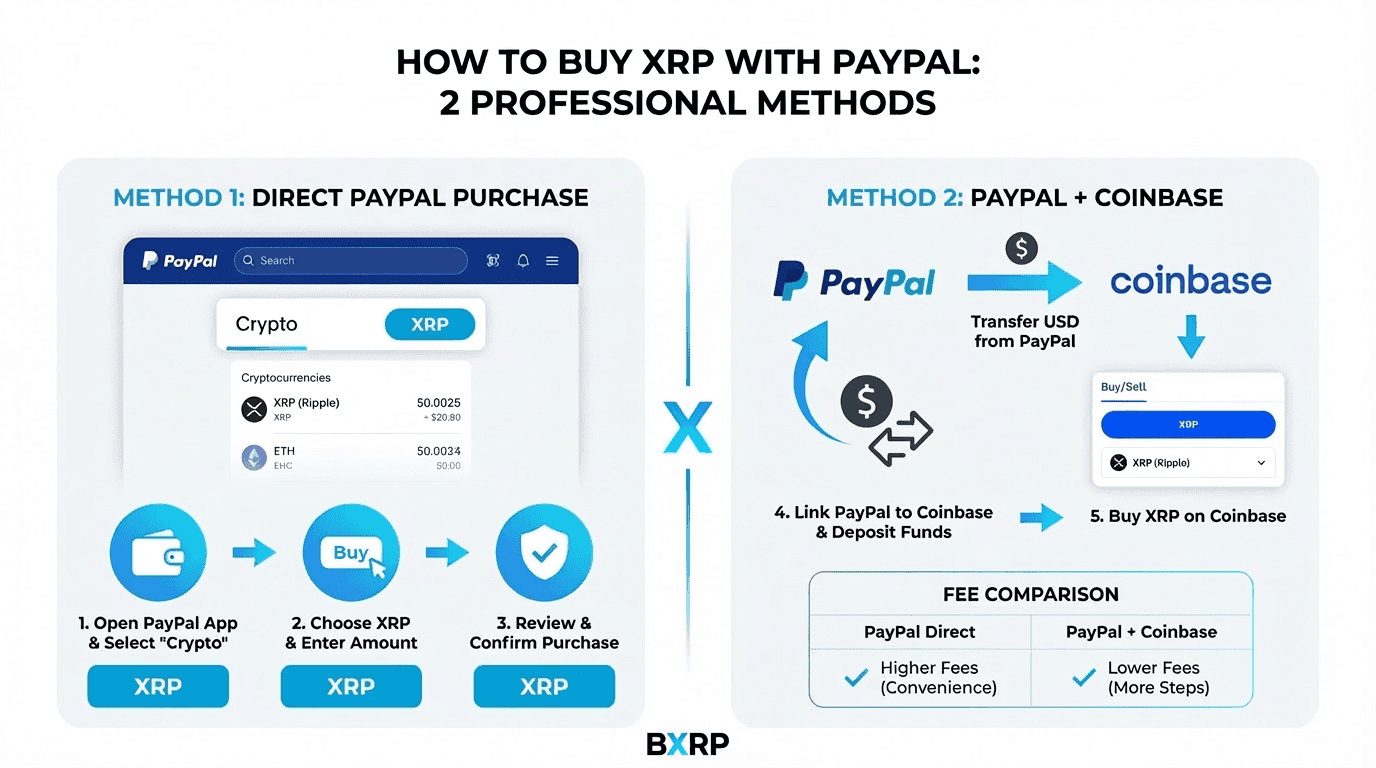
PayPal cannot buy XRP directly through its consumer cryptocurrency service. To buy XRP with PayPal, use it as a deposit or payment method on crypto exchanges like Coinbase or CEX.IO that accept PayPal funding and list XRP for trading.
PayPal is one of the most widely used digital payment platforms in the world, with over 430 million active accounts globally (PayPal Investor Relations, Q4 2024). Many cryptocurrency buyers expect to purchase XRP directly through PayPal’s built-in crypto service, but PayPal’s cryptocurrency offering supports only five consumer assets: Bitcoin, Ethereum, Litecoin, Bitcoin Cash, and PayPal USD (PayPal Cryptocurrency FAQ, 2025). XRP is not among them.
That does not mean PayPal is useless for buying XRP. US-based buyers can use PayPal as a deposit method on Coinbase to fund their account and then purchase XRP through the exchange’s standard trading interface. CEX.IO offers a PayPal Instant Buy feature that lets users purchase XRP directly with PayPal in select regions. Third-party services like Paybis and MoonPay also accept PayPal for XRP purchases. This guide covers each method, including the fees at every step, how withdrawals work, and whether PayPal or a bank transfer offers better value. For the complete XRP purchase process covering all payment methods, see our complete step-by-step XRP buying guide.
Can You Buy XRP on PayPal?
No, PayPal’s consumer cryptocurrency service does not include XRP — it supports only Bitcoin, Ethereum, Litecoin, Bitcoin Cash, and PYUSD. To buy XRP with PayPal, use it as a deposit or payment method on exchanges like Coinbase or CEX.IO that accept PayPal funding.
PayPal launched its cryptocurrency buying and selling feature for US customers in October 2020, initially supporting four assets: Bitcoin, Ethereum, Litecoin, and Bitcoin Cash. The platform added PayPal USD (PYUSD) in August 2023 (PayPal Newsroom, 2023). Despite XRP being the third- to sixth-largest cryptocurrency by market capitalization — with a market cap consistently above $80 billion in 2026 — PayPal has not added XRP to its consumer asset list.
The reason PayPal excludes XRP likely relates to the extended regulatory uncertainty caused by the SEC v. Ripple lawsuit (Case No. 20-cv-10832, S.D.N.Y.), which began in December 2020. Although the case concluded in August 2025 with the SEC confirming that XRP sold on exchanges is not a security (SEC Litigation Release No. 26306, May 8, 2025), PayPal has not updated its consumer crypto offering to include XRP as of February 2026.
PayPal’s “Pay with Crypto” merchant feature, announced in July 2025, does support XRP among 100+ cryptocurrencies for payment at US merchants with a 0.99% fee through July 2026 (PayPal Newsroom, July 28, 2025). However, this is a business-to-consumer merchant payment service — it allows spending XRP at checkout, not purchasing it. Buyers cannot use Pay with Crypto to acquire XRP they do not already own.
The practical solution is to use PayPal as a funding source on an exchange that both accepts PayPal deposits and lists XRP for trading. Coinbase and CEX.IO are the most accessible platforms for this purpose, and several third-party services also accept PayPal for XRP purchases globally.
Understanding that PayPal itself does not sell XRP, the next step is learning the specific methods available to buy XRP using your PayPal account as the payment source.
How Do You Buy XRP with PayPal?
Buy XRP with PayPal by depositing funds from PayPal into a crypto exchange that accepts it. On Coinbase, link your PayPal account, deposit USD (2.5% fee), then buy XRP. On CEX.IO, select PayPal in Instant Buy to purchase XRP directly.
There are three primary methods to buy XRP using PayPal as your payment source. Each involves a different platform and fee structure.
Method 1: Deposit via PayPal on Coinbase (Recommended for US Buyers)
Coinbase is the most widely used US cryptocurrency exchange that accepts PayPal as a deposit method. US customers can link their PayPal account to Coinbase and use it to fund XRP purchases through two paths. The first path is a two-step deposit-then-trade approach: deposit USD from PayPal into your Coinbase balance at a 2.5% fee, then buy XRP on the trading platform at approximately 0.60% (Coinbase Advanced Trade taker fee). The total cost is roughly 3.1% on any purchase. The second path is Coinbase’s direct buy feature, which processes the PayPal payment and XRP purchase in a single step at a flat 3.99% all-in fee (Coinbase Help Center, “Pricing and Fees,” 2025).
The process works as follows: First, create a Coinbase account and complete KYC verification with a government-issued ID. Second, navigate to payment settings and add PayPal as a payment method by logging into your PayPal account when prompted. Third, select XRP from the asset list and enter your purchase amount. Coinbase processes the transaction instantly, and your XRP appears in your Coinbase wallet within seconds. From there, you can hold XRP on Coinbase or withdraw it to any external XRP wallet for using Coinbase with PayPal for XRP. The daily purchase limit using PayPal on Coinbase is $25,000.
Method 2: CEX.IO PayPal Instant Buy
CEX.IO supports direct XRP purchases via PayPal through its Instant Buy feature, available to US customers. Select PayPal as the payment method, enter the amount of XRP you want to purchase, and CEX.IO processes the transaction with a spread-based fee plus a service charge. CEX.IO provides a simpler one-step experience for buyers who want to purchase XRP with PayPal without managing a separate deposit step.
Method 3: Third-Party Platforms Accepting PayPal
Several cryptocurrency services outside the major exchanges accept PayPal for XRP purchases. Paybis is a regulated crypto on-ramp available in 180+ countries that processes PayPal-funded XRP purchases and sends the XRP directly to your specified wallet address. MoonPay and Zengo also facilitate PayPal-to-XRP transactions through their payment provider networks. Changelly offers PayPal as a payment option in select regions.
Third-party platforms typically charge 1–4% of the transaction amount including spreads and processing charges. Their key advantage is non-custodial delivery: the XRP goes directly to your wallet without requiring an exchange account. They also provide an option for buyers outside the US where Coinbase’s PayPal integration may not be available.
Note: Kraken accepts PayPal deposits only for EUR, GBP, and AUD — not USD. US-based buyers cannot use PayPal on Kraken to fund XRP purchases.
All three methods involve fees at different stages, making it essential to understand the full cost structure before choosing your approach.
What Are the Fees for Buying XRP with PayPal?
Fees depend on the exchange. Coinbase charges 2.5% for PayPal deposits plus a 0.60% trading fee (total ~3.1%), or 3.99% for direct PayPal buy. Third-party services like Paybis and MoonPay charge 1–4%. Free ACH bank transfers avoid PayPal surcharges entirely.
Because PayPal does not sell XRP directly, there is no single “PayPal fee” for buying XRP. The total cost depends on which method and platform you use. The following table compares fees across the most common approaches:
| Method | Deposit Fee | Trading Fee | Total % | Cost on $500 |
|---|---|---|---|---|
| Coinbase PayPal deposit + trade | 2.5% | ~0.60% | ~3.1% | ~$15.50 |
| Coinbase PayPal direct buy | Included | 3.99% | 3.99% | $19.95 |
| CEX.IO via PayPal | Spread-based | + service fee | ~3–4% | ~$15–$20 |
| Paybis / MoonPay via PayPal | 1–4% | Included | 1–4% | $5–$20 |
| Coinbase via ACH bank transfer | Free | ~0.60% | ~0.60% | ~$3.00 |
| Binance via bank (no PayPal) | Free | 0.10% | 0.10% | ~$0.50 |
The Coinbase two-step method (deposit then trade) saves roughly 0.9% compared to Coinbase’s direct buy. On a $500 XRP purchase, this means paying approximately $15.50 instead of $19.95 — a difference of $4.45. On a $5,000 purchase, the two-step method costs roughly $155 versus $199.50 for the direct buy (Coinbase Fee Schedule, 2025).
The fee differential between PayPal and bank transfer methods is substantial. A buyer purchasing $500 of XRP monthly via PayPal on Coinbase (two-step) would pay approximately $186 in annual fees, compared to $36 using ACH bank transfer — a $150 annual difference. On Binance using bank deposit at 0.10%, the same monthly purchases cost just $6 per year in trading fees (Binance Fee Schedule, 2025).
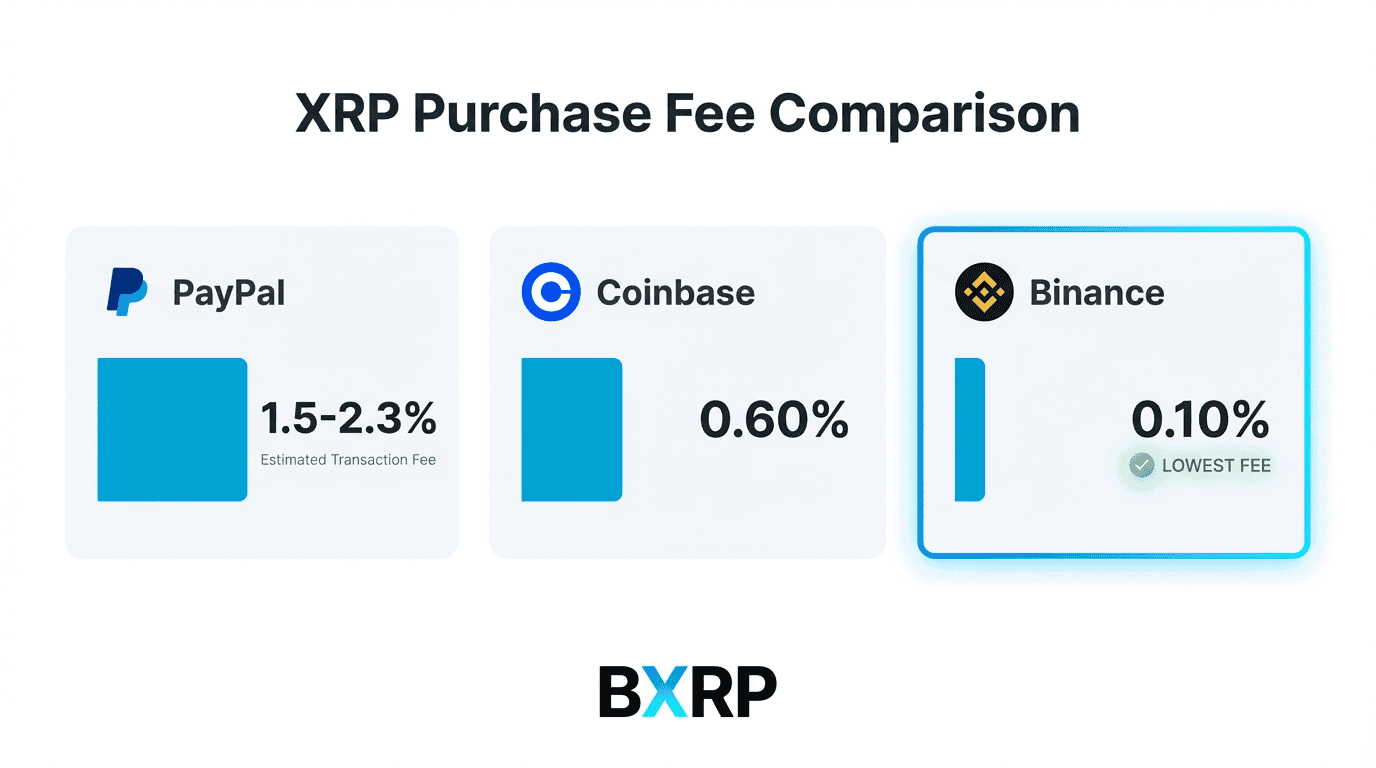
For buyers prioritizing cost, depositing via bank transfer and purchasing XRP on an exchange with low trading fees offers the best value. PayPal’s advantage is speed and convenience — PayPal deposits process instantly, while ACH bank transfers take one to five business days to settle. Buyers should weigh this convenience against the significant fee premium.
Beyond fees, buyers need to understand whether their chosen method allows XRP withdrawals to external wallets — a critical distinction for long-term holders.
Can You Withdraw XRP Bought via PayPal Deposit?
Yes. When you buy XRP on an exchange using PayPal as the deposit method, the XRP belongs to you and can be withdrawn to any external wallet — hardware, software, or another exchange. This is a key advantage over PayPal’s own crypto service, which restricts withdrawals.
This is one of the most important distinctions to understand. Because you are buying XRP on a cryptocurrency exchange — not through PayPal’s built-in crypto hub — you receive full ownership and withdrawal rights. PayPal serves only as the payment method to fund the exchange account; the exchange handles the XRP custody.
When you buy XRP on Coinbase using PayPal as the deposit method, your XRP sits in your Coinbase account. From there, you have full control: you can hold XRP on Coinbase’s exchange, which is insured against platform breaches; withdraw XRP to an external software wallet such as Xaman (formerly XUMM) or Trust Wallet; send XRP to a hardware wallet like Ledger Nano X or Tangem for long-term cold storage; or transfer XRP to another exchange. Coinbase charges a network fee for XRP withdrawals — typically under $0.01 due to the XRP Ledger’s minimal transaction costs. The withdrawal processes in three to five seconds once confirmed.
This stands in contrast to PayPal’s own crypto service, which historically restricted external transfers. Although PayPal added crypto transfer functionality for its supported assets (Bitcoin, Ethereum) in 2022, XRP is not a supported asset, so the question of PayPal’s transfer limitations is moot (PayPal Cryptocurrency Terms, 2025).
If you use a third-party platform like Paybis, the XRP is sent directly to the wallet address you provide during checkout, giving you immediate self-custody without an intermediate exchange account. For a comprehensive overview of wallet options, see self-custody options for your XRP.
With fees and custody clarified, the final consideration is whether PayPal or a bank transfer is the better funding method for buying XRP on an exchange.
Is It Better to Use PayPal or a Bank Transfer for XRP?
Bank transfers are cheaper for buying XRP because ACH deposits on Coinbase and Kraken are free, compared to 2.5–3.99% for PayPal. PayPal’s advantage is speed — deposits arrive instantly versus one to five business days for bank transfers.
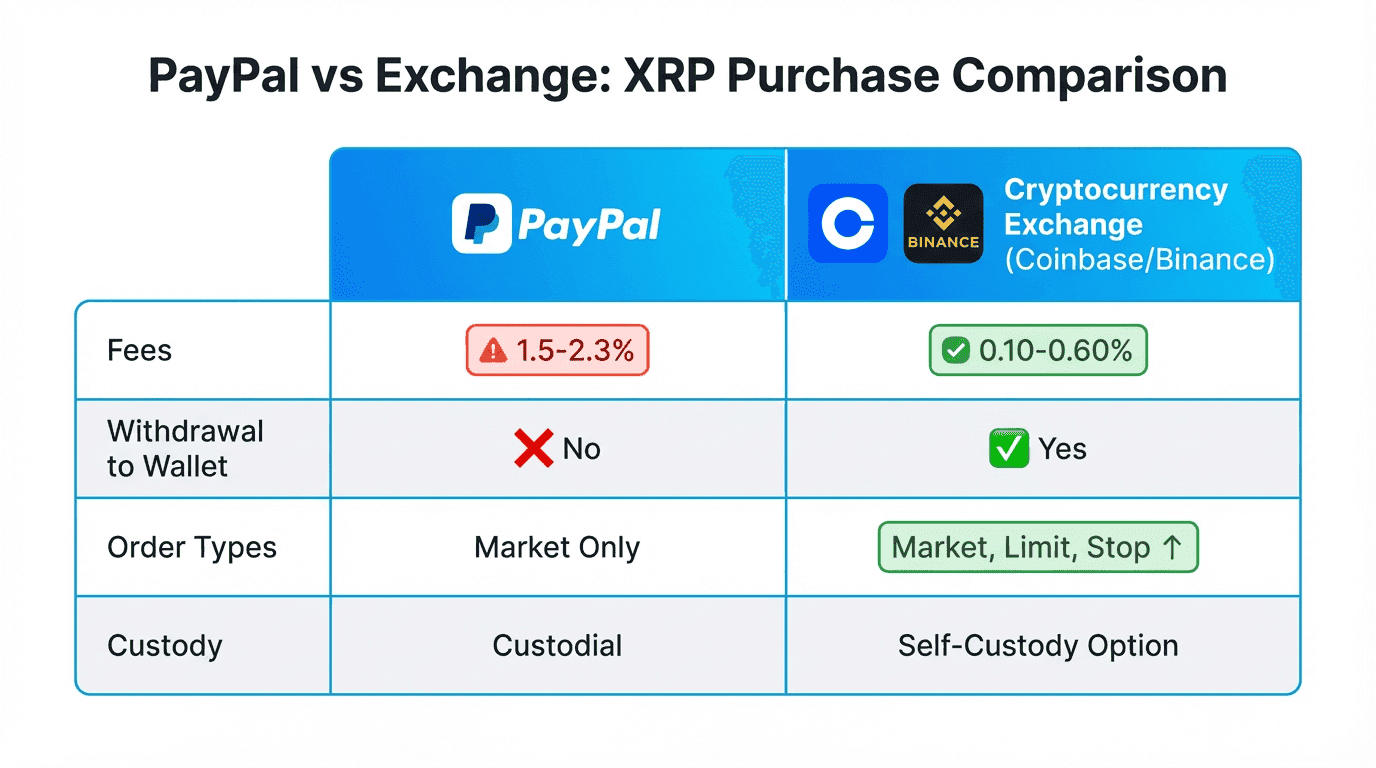
Since PayPal and bank transfers are both exchange funding methods, the real comparison is speed versus cost on the same platform. The following table summarizes the key differences:
| Feature | PayPal on Coinbase | ACH Bank Transfer | Wire Transfer |
|---|---|---|---|
| Deposit Fee | 2.5% (or 3.99% direct) | Free | $10–$25 |
| Processing Speed | Instant | 1–5 business days | Same day |
| Trading Fee | 0.60% (Advanced Trade) | 0.60% | 0.60% |
| Total Cost on $500 | $15.50–$19.95 | ~$3.00 | $13–$28 |
| Daily Limit | $25,000 | $25,000+ | $25,000+ |
| Order Types | Market + Limit | Market + Limit | Market + Limit |
| Best For | Speed, convenience | Cost savings | Large purchases |
PayPal’s primary advantage is instant funding. If XRP’s price is moving and you want immediate exposure, PayPal on Coinbase provides same-second execution. ACH bank transfers require waiting one to five business days for the deposit to settle before you can trade, during which the XRP price may change significantly.
For buyers focused on minimizing costs, bank transfer deposits are substantially cheaper. On a $1,000 XRP purchase, PayPal adds approximately $31 in fees (2.5% deposit + 0.60% trade) versus roughly $6 via free ACH deposit on Coinbase, or as little as $1 on Binance using bank deposit with a 0.10% trading fee (Coinbase Fee Schedule, 2025; Binance Fee Schedule, 2025). Over multiple purchases, this difference compounds significantly.
For buyers who want buying XRP with a credit or debit card instead, card deposits offer instant funding at 1.8–3.99% depending on the exchange — a speed profile similar to PayPal but with varying fee structures. To compare all XRP exchanges and payment options side by side, see our exchange comparison guide.
The following frequently asked questions address specific scenarios and edge cases for buying XRP with PayPal.
Frequently Asked Questions About Buying XRP with PayPal
Does PayPal support buying XRP directly?
No, PayPal’s consumer cryptocurrency service does not support buying, selling, or holding XRP. PayPal’s crypto hub is limited to Bitcoin, Ethereum, Litecoin, Bitcoin Cash, and PayPal USD. To buy XRP with PayPal, use it as a deposit method on Coinbase or CEX.IO, or through third-party platforms like Paybis that accept PayPal.
Can I use PayPal to deposit on Coinbase?
Yes, US customers can add PayPal as a payment method on Coinbase. Navigate to Settings, then Payment Methods, and select “Add a Payment Method.” Choose PayPal and log into your PayPal account to authorize the connection. Coinbase charges 2.5% for PayPal deposits or 3.99% for direct PayPal crypto purchases.
What exchanges accept PayPal for XRP purchases?
Coinbase and CEX.IO are the primary exchanges accepting PayPal for XRP purchases in the United States. Coinbase supports PayPal as both a deposit method and direct buy option. CEX.IO offers PayPal through its Instant Buy feature. Kraken accepts PayPal deposits only for EUR, GBP, and AUD — not USD — so US buyers cannot use Kraken with PayPal.
Does PayPal charge a fee for buying XRP?
PayPal itself does not charge a fee for XRP because it does not offer XRP. The fees are charged by the exchange processing your PayPal deposit. Coinbase charges 2.5% for deposits or 3.99% for direct purchases. CEX.IO uses spread-based pricing plus a service fee. Third-party platforms like Paybis charge 1–4%.
Is PayPal or a bank transfer cheaper for buying XRP?
Bank transfers are significantly cheaper. ACH deposits on Coinbase are free, making the total cost roughly 0.60% per trade. PayPal deposits cost 2.5% before trading fees, bringing the total to approximately 3.1%. On a $500 purchase, this means paying $3 via bank transfer versus $15.50 via PayPal — more than five times the cost.